
How Do QR Codes Work? Complete Guide to QR Technology
Follow Us

The QR code is not as new as people think; in fact, it has been around for quite a while now, and it has grown into a big part of our digital landscape. They have become common across industries, from restaurants to products, payments, tickets, and advertising. However, many people still have questions about QR codes – how do they work? How are they created, and what happens when you scan one?
This article will explain some of the most common thoughts surrounding QR codes in easy-to-understand terms, covering what QR technology consists of (i.e., how QR codes are created and how they store information), as well as the difference between static and dynamic QR codes.
What is QR technology?
Before learning how QR codes work, you need to understand what QR technology is.
QR technology encodes information into a visual pattern that machines (such as smartphone cameras) can read. The system is based on a combination of:
- Encoding (converting data to a QR pattern).
- Error correction (the ability of QR codes to be read even when damaged).
- Decoding (reading data with a scanner or camera).
This whole system is called QR code encoding and decoding technology.
The anatomy of a QR code
Understanding the anatomy of a QR code helps explain how rapid scanning works.
There are several key parts to a QR code:
- Finder patterns (three large squares for finding)
- Alignment patterns (to aid scanning accuracy)
- Timing patterns (organize the grid)
- Data modules (which store actual data)
- Error correction information (helps recover damaged codes)
Each part contributes to creating QR codes that are quick, reliable, and scannable from various angles.
How do QR codes work?
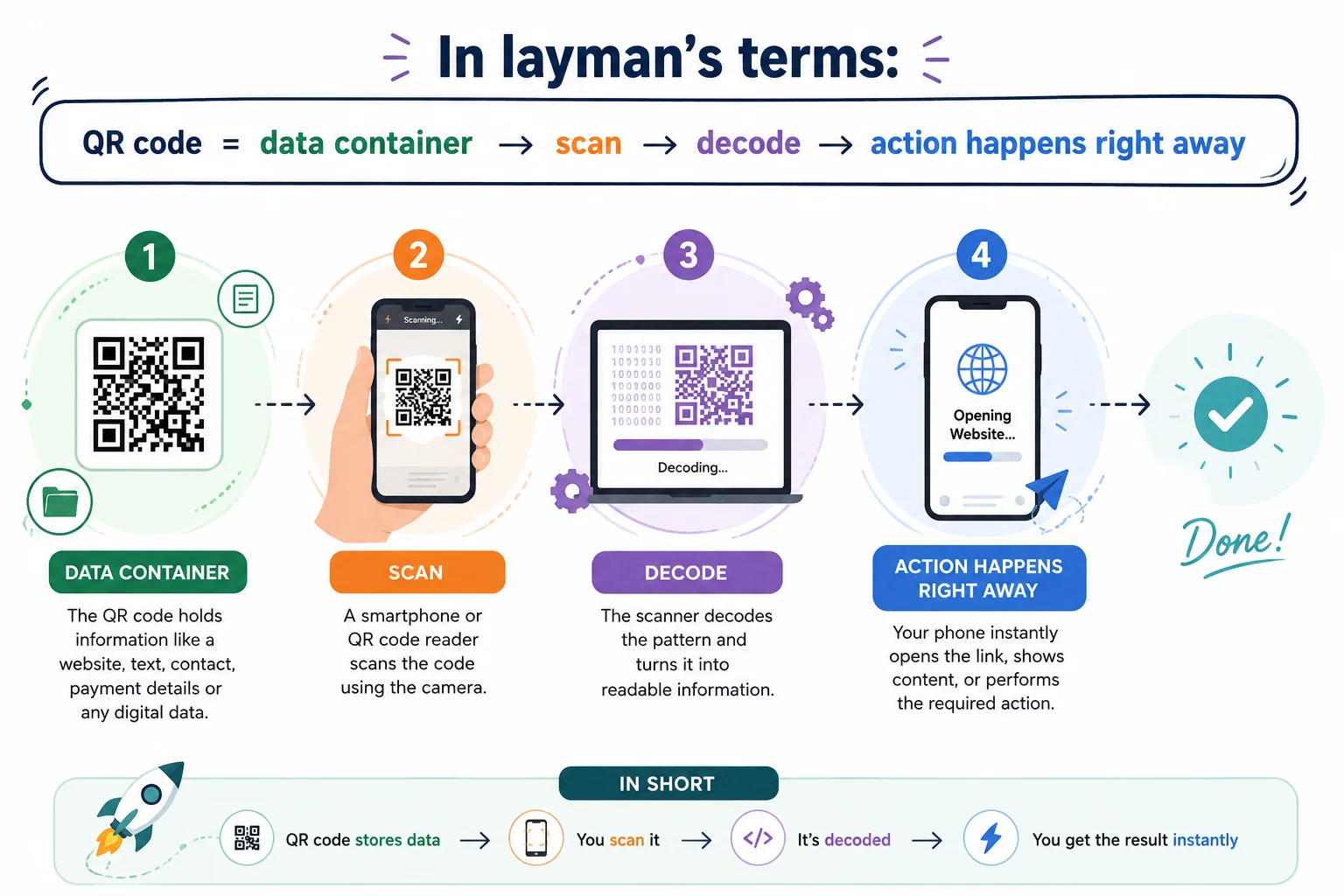
When someone scans a QR code, it happens in seconds:
- First, the QR code reader technology (your phone camera or app) recognizes the code pattern. Then the system identifies the orientation of the code and the alignment markers.
- The data within the QR code is then decoded into readable information, like a website, text, or an action link.
- Finally, your device takes action, whether that’s opening a webpage, bringing up a menu, or sending you to a payment page.
How is data stored in a QR code?
QR code encoding involves systematically placing data in a grid into a QR code. The first step in creating a QR code is choosing the information to be included in the code, which can be a URL or written text, and then translating it into binary, or a sequence of 0s and 1s. This binary data is then organized into a predetermined square matrix, which forms the matrix of the QR code.
Codes may be corrupted, but the inclusion of error-correcting codes leaves them reliable and readable. The created visual pattern is then displayed as the QR image, which is displayed when the structure is finished. This is the whole process of creating a QR code, which we call the QR code generation process.
How to create a QR code?
Making QR codes is simple but technically structured. QR codes are generated by a QR code generator, a free tool or software that:
- Inputs (text, URL, or file)
- Encodes it into a form readable by a machine
- Set error correction level
- Creates a scannable image
Here is how to create a QR code in practice. Most of the modern tools let you create in seconds.
Static QR codes vs. Dynamic QR codes
Feature | Static QR Codes | Dynamic QR Codes |
Data type | Fixed information | Editable information |
Editing after creation | Not possible | Possible anytime |
Tracking & analytics | Not available | Available (scan data, user insights) |
Use case | Simple, permanent sharing (text, URLs) | Marketing, campaigns, business operations |
Flexibility | Low | High |
Link updates | Cannot be changed | Can be changed without changing the QR code |
Performance monitoring | Not possible | Possible with detailed analytics |
Best for | Basic, long-term fixed content | Businesses, promotions, dynamic content |
Static QR codes are best for information that will not change, and dynamic QR codes are perfect for businesses that need to be flexible and have tracking and control over their QR campaigns.
View Resource: Static vs. Dynamic QR Codes: What’s the Difference
What are QR codes used for?
QR codes are used across industries for multiple purposes:
- Digital payments
- Restaurant menus
- Event tickets
- Marketing campaigns
- Product tracking
- Wi-Fi access sharing
- Authentication systems
This makes QR codes one of the most versatile digital tools today.
QR codes: safety and security
The QR codes are generally safe and intended to enable quick and easy access to digital content. So, it is advisable to scan codes only from trusted sources, as they can go directly to the web page, app, or payment form.
Most of the devices we now know as ‘smartphones’ and the capabilities of QR code readers allow users to preview links before opening them. Also, businesses ought to use secure links and trusted QR code generators to ensure users have a safe experience.
If used correctly, QR codes are both secure and rapid.
QR technology explained in simple terms
In plain language, understanding QR technology means understanding how data is encoded into a pattern that a machine can quickly scan and turn back into useful information.
It blends:
- Data encoding
- Visual pattern identification
- Quick decoding of the smartphone camera
And that’s why QR codes seem instantaneous and seamless in real-world usage.
Conclusion
So how do QR codes work? They store data in a visual pattern that can be instantly scanned, decoded, and converted into action.
All about the QR technology and how QR codes are created. Fast encoding and decoding systems that make information instantly accessible. QR technology is now a fundamental part of digital interaction.
Want to generate your own QR code?
Try QR Inventor’s free QR code generator to build dynamic, trackable, and modern QR experiences for your business or personal use today.
Frequently Asked Questions (FAQs)
QR codes are unique 2D barcodes that can contain data for smartphones to read, such as a URL, text, contact details, payment details, etc.
QR codes are encoded in a square matrix pattern, which can be read and decoded by the camera of a smartphone or QR code reader technology.
QR code generators, such as QR Inventor, can be used online to generate a QR code. Just enter your info (text, link, or file) into the QR generator, and it will create a QR code pattern for you!
QR codes are used to make payments, for restaurant menus, on websites, in digital tickets, to get product information, to share Wi-Fi, to advertise, and for so many other digital interactions.
Dynamic QR codes might expire depending on the QR code service provider or subscription plan, while static QR codes never expire.
In most cases, yes, screenshots of QR codes will function just fine as long as they’re clear and scannable.
Yes, they generally are. You can scan QR codes safely. Users are advised against scanning QR codes of unknown/unrecognized persons/situations and are advised to check the links before clicking.
Yes, QR codes do hold a lot more information than barcodes. Data is composed of URLs, text, files, and contact data.
Many modern smartphones have an application available for them to read QR codes without the use of extra software.
Categories


Table of Contents
- What is QR technology?
- The anatomy of a QR code
- How do QR codes work?
- How is data stored in a QR code?
- How to create a QR code?
- Static QR codes vs. Dynamic QR codes
- What are QR codes used for?
- QR codes: safety and security
- QR technology explained in simple terms
- Frequently Asked Questions